“A labour of love for the swimmers of Cabbage Tree Bay. Free, independent, and built to serve our local community.”
I created this tool because my partner swims here daily and wanted a better way to understand the bay's unique moods. It's for us — the locals, the visitors, and everyone who loves this corner of paradise.
Marco Bordieri
Bay Diver & Creator
The main screen
The three metrics
Every forecast hour is scored against 3 variables: getting in at the ramp, dealing with water movement in the bay and breathing air, not water.
Each one is a dot on a rail. Tap any band below to see what it means in the water.
Safety first
It's a forecast, not a lifeguard, and it is not a substitute for standing on the sand and watching a few sets go through. Swim with someone and never past your own limits because a dot was green.
Entry
measured at the south corner
How hard it is to get in and out over the sand and rocks at the southern end of South Steyne.
CalmHazardous
Surge
measured mid-bay
Long swell rolling through the bay: the slow back-and-forth that carries you off your line, especially near the rocks.
StillPushed around
Chop
measured mid-bay
The short, steep, wind-made stuff that slaps your face when you breathe. It's about your stroke, not your safety.
GlassWashing machine
Top of the screen
How much you want to see
Two buttons sit at the top of the page — The lot and Customise. They decide how much of the app you get. Tap one and it stays that way, on this phone, until you change it.
The lotCustomise
The lot
Everything. The swell and wind-chop maps, the tide graph, the week ahead, and the raw forecast numbers behind the dots. This is what you start with.
Customise
Tick the sections you want and save. The verdict, the dots and the timeline always stay — the rest is yours to hide. It's also where the three display choices below live: how the dots are drawn, how you pick the time of day, and who stars in the pictures.
Entry / Surge / Chop indicators
Picture + slider
Slider only
Pictogram character
Human
Sea dragon
Cat
Dog
Swaps who's drawn in the Entry, Surge and Chop pictures. It changes the drawing only — the readings, the colours and the verdict are identical whichever you pick.
Time-of-day picker
Now9a12p3p
Tap buttons
Slider
9a12p3p
Brass roller
One minute
Put it on your home screen
Tap to open · Read it once, then never again
Swim Manly is a web app — no store, no account, no ads, nothing tracked. Add it to your home screen and it opens like any other app, full screen, and loads even on a bad signal down at the beach.
Did you get here from a Facebook link? Facebook opens pages inside its own browser, and a tile cannot be added from there — the option simply isn't in the menu. Tap the three dots in the corner and choose Open in external browser (on iPhone it may say Open in Safari or Open in Chrome), then follow the steps for that browser below. Instagram works the same way.
iPhone — Safari
Tap the Share icon — a square with an arrow pointing up — in the bar at the bottom of the screen.
Scroll down till you see Add to Home Screen and tap it.
Tap Add (top right). If you see an Open as Web App switch, leave it on.
iPhone — Chrome
Tap the Share icon at the top right, beside the address bar. Ignore Share to Chrome at the bottom — that one does not add a tile.
Scroll down till you see Add to Home Screen and tap it.
Tap Add (top right).
Android — Chrome
Tap the three vertical dots at the top right.
Select Install app (or Add to Home screen).
Confirm by tapping Install or Add.
Android — Samsung Internet
Tap the three lines at the bottom right.
Tap Add page to, then Home screen.
Confirm by tapping Add.
The rest of the screen
The other cards
Water quality
Straight from Beachwatch NSW who provides updates every day 6am and 1:30pm. It's worth a glance after heavy rain.
Reported by swimmers, for swimmers. If you get stung, or you see a windrow of them on the sand, log it. It takes ten seconds and it's the only bluebottle data anyone has for this bay. Your first report needs a photo — after that, it's optional.
You can file one report every four hours, and each report stays on the card for 24 hours. Long enough that a dawn sighting still warns the lunchtime crowd; short enough that yesterday's bloom doesn't haunt a clean bay.
Under the hood
How the score is built
Tap to open · The maths, if you want it
The app starts each hour with a clean slate, then takes points off for everything the ocean throws at it. Fewer penalties, better swim. Six things drive it:
Swell height
The biggest single lever. Energy climbs with the square of the height — a 1 m swell isn't twice a 0.5 m swell, it's four times.
Swell period
Seconds between waves. Long-period swell carries far more energy than short wind slop of the same height, and it's the part that surges through the bay.
Swell direction
The bay is a trap with one door. A southerly swell dies on the headland; a north easterly walks straight in, a south easterly goes straight towards The Corso sparing swimmers or finds you around the headland depending on the period. The app runs the direction and period through a shelter table built for this bay's exact shape.
Wind
Offshore wind (from the west) grooms the surface and actually earns credit. Onshore wind builds chop over the fetch and costs you. Direction matters more than speed.
Sea (AKA wind wave)
One of the two wave forecasts we're handed. Swell has travelled here from a distant storm; sea is the wave the wind is raising nearby, right now, still underneath the wind that made it. Each arrives as a height, a period and a direction, and each is run through the bay's shelter table. Sea is short and steep — a few seconds between crests — so less of it bends around the headland, but what gets in arrives steep.
Chop
The short, steep surface texture inside the bay — the stuff that slaps your face when you turn to breathe. It is not Sea: sea is what's forecast outside the bay, chop is what you swim through inside it. The app builds it from the wind actually blowing over the water you're in, growing it with wind speed and with the fetch it has had to work on. The headland and the buildings west of the swim patch cut that fetch down, which is why a strong westerly leaves the bay far smoother than its speed suggests.
Tide
On a low tide the footprint of the headland extends and provides more shelter. On a high tide it's the opposite, opening the door to more swell and range of directions.
Where we measure
The app scores multiple spots you actually swim at.
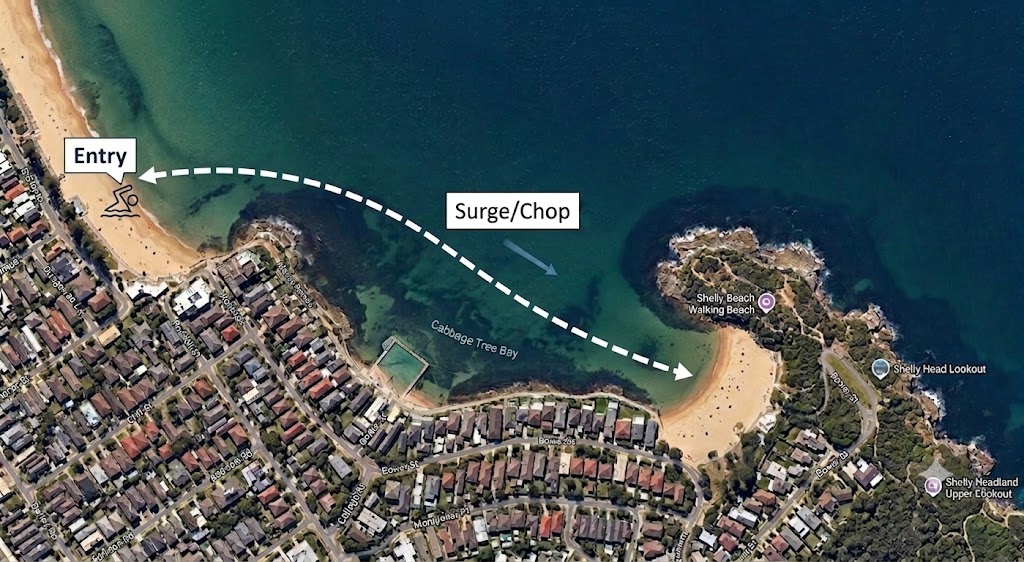
Entry is scored at the south-west corner of South Steyne, where most swimmers start. Surge is measured mid-bay near the halfway entrance at Bower Lane; Chop is the average across the dashed line running across to Shelly Beach.
The water you swim in
It's a reserve, and it shows
Ask anyone who was here before 2002 and they'll tell you the bay was fished out. Almost nothing left. Then a group of locals lobbied, and in March that year Cabbage Tree Bay was declared a no-take aquatic reserve — twenty hectares, the whole bay, from the southern end of Manly Beach to Shelly Headland.
Swim it now. Blue gropers that follow you like dogs. Wobbegongs asleep under the ledges. Giant cuttlefish, more than 450 species of fish across seven habitats in a bay you can cross in twenty minutes. Not on a good day, not in season — all year. That is what happens when you stop taking things out.
You're swimming through a protected area. The whole bay, the rocks, the sand:
no fishing, any methodtake nothing, dead or alivenot even empty shellsdon't touch, don't chaseno dogs
The shells are somebody's house. The urchins are not fish food. And the groper who swims up to your mask is doing it because nobody here has ever given him a reason not to.
The fishing stopped; the stormwater didn't. What goes down a drain on the Corso arrives in the water you breathe next to. Carry your rubbish back up the hill, and pick up someone else's if it's floating past you.
We got lucky, and we didn't.
This bay is not an accident of geography — it's twenty-odd years of people choosing to leave it alone, and the volunteers of Friends of Cabbage Tree Bay keeping an eye on it. Every swim you take here is on the back of that. Swim like a guest.
Who made this
About this app
Swim Manly is an independent, community-led project. Using custom wave-modelling and local data, we provide forecasts specifically for the Cabbage Tree Bay Aquatic Reserve, helping you make informed decisions before you hit the water.
Our goal
To help you make informed decisions before you head to the beach. This app is a completely non-profit, community-led initiative born from our shared passion for the Cabbage Tree Bay Aquatic Reserve. Whether you're a local or coming from further afield, we hope this tool makes your swim a little easier, safer, and more enjoyable.
Are you a snorkeler or a scuba diver?
Join the VIZ Facebook group for fresh underwater visibility reports, or try the twin app VIZ APP for a diveability forecast across Sydney.
The Swim Manly app is provided for informational and recreational purposes only. It is not a professional oceanographic, meteorological, or lifeguard-operated safety system. All forecasts, scores, and data (including but not limited to swell, chop, surge, and pollution risk) are generated by automated modeling and community reporting. These data points may be inaccurate, delayed, or incomplete.
2. Personal Responsibility
Ocean conditions are dynamic and unpredictable. A “good” or “safe” score displayed by this app does not guarantee safety. Users must always assess the actual conditions on the sand and in the water before entering the bay. Always check official sources (such as Surf Life Saving NSW or Beachwatch) for authoritative information. You are solely responsible for your own safety and for exercising sound judgment regarding your swimming abilities and local weather conditions.
3. Limitation of Liability
To the maximum extent permitted by applicable law, the creator of this app, Marco Bordieri, and the VIZ Group assume no liability for any direct, indirect, incidental, or consequential damages, personal injury, or loss arising from your use or reliance on the information provided by this application. By using this app, you acknowledge that you are swimming at your own risk and accept full responsibility for your actions.
4. No Substitute for Lifeguards
This application is not a substitute for the presence of professional lifeguards, nor is it a monitoring tool for emergency services. If in doubt, stay out of the water.